
Guides
How to log daily eye care and review it between eye exams
Daily notes become useful at a follow-up when their dates and gaps are clear. Record what happened, check what is missing, and keep the activity history alongside the original exam reports. A clear log makes the next conversation easier to prepare for.
These guides cover record keeping and appointment preparation, not diagnosis or treatment. Sightly does not assess medical risk or recommend treatment. Your clinician interprets examinations and decides care and follow-up timing.
1. Start with the child and the actual day
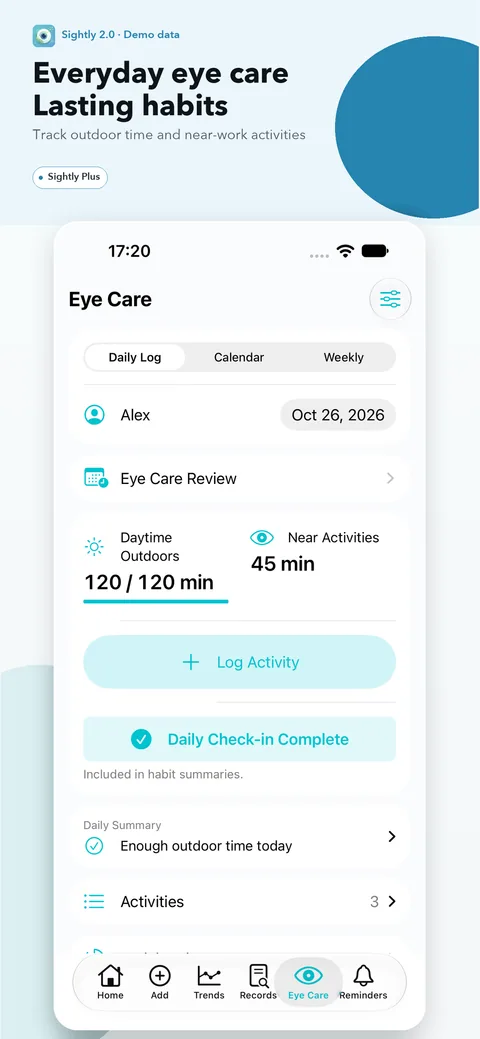
In Sightly Plus, open Eye Care, choose the child and select the day the activities happened. The batch form lets you add several activities and their durations together, such as walking, reading and homework. A timer or an individual entry can also be used when that is easier. Record the time you know; do not invent a duration to fill an empty row.
Saving a batch adds entries to that day rather than replacing earlier ones. Before saving again, check the existing entries. If the app asks you to confirm a possible duplicate, compare the activities and cancel if they have already been recorded.
2. Keep activity categories and context accurate
Daytime outdoor time and near work are separate categories. Check the daylight setting for an outdoor activity, even when the batch form suggests daytime by default. An indoor game or activity with unknown outdoor context should not be described as confirmed daytime outdoor time. Correct the context when you know it; otherwise leave it unresolved.
Reading, homework and close-up device use belong in the app’s near-work category. Television can be recorded as screen time, but Sightly does not count it as near work or daytime outdoor time by default. Choose each category according to what happened so the history stays useful to review.
3. Review the day before confirming it complete
Look back through the saved activities and compare them with what you actually remember. Remove or correct accidental duplicates after checking the entries; keep genuinely separate sessions separate. If an outdoor context is unresolved, resolve it before relying on a complete-day summary.
Confirm a day as fully recorded only when its relevant activities have been accounted for. A missed day stays missing, not zero. If you remember only part of a day, keep the partial record without calling it complete. Do not fill a gap from a typical schedule or from another child’s log.
4. Read the habit summary as a record summary
After at least seven confirmed complete days, Sightly Plus shows a habit interpretation and supporting day counts. Seven is the app’s display threshold, not a medical threshold. The averages use only confirmed complete days with resolved outdoor context; days with no record are not treated as zero.
Fictional example, not a real child or measured result: In an anonymous sample week plus one day, seven days have reviewed activity entries and are confirmed complete; the eighth day was not logged. The summary describes those seven days only. The missing day cannot tell you whether the child was indoors, outdoors or doing near work.
5. Review the daily log with the next exam
With Plus and saved exams, the between-exams review shows recorded activities alongside available eye measurements. For two completed exams, the activity interval runs from the day after the earlier exam through the day before the later one. The ongoing review runs from the day after the latest exam through today. Check the dates and how many complete days are represented before discussing a pattern.
The activity summary and axial length changes can be reviewed together. Bring the original reports and ask the clinician which examinations are comparable and how to interpret the results.
6. Prepare a small, private follow-up pack
Before the visit, keep the two exam dates, original reports, a brief note on which activity days were complete or missing, and a few questions: Which measurements can be compared? Are there gaps in the history that matter? What should we record before the next appointment? The clinician determines the interpretation and follow-up plan.
Sightly’s manual local backup includes activity records as well as exam data. Export a private backup before changing devices or removing the app; restoring a backup replaces current local records, so retain a current copy first. Share only the records needed for the appointment, after checking for identifiers in reports and screenshots.
Quick checklist
- Actual child and activity dates selected; durations reflect what is known.
- Daylight and near-work categories checked; television left in its own screen category.
- Possible duplicate batches reviewed before confirmation.
- Partial or missed days are not marked complete or counted as zero.
- Summary coverage and the two exam dates checked before discussion.
- Original reports, questions and a private current backup are available.
Using Sightly
Daily activity logging, timers, habit summaries and reviews between exams are Sightly Plus features. Sightly stores exam and activity records on the device without an account or automatic cross-device sync. The app keeps the recorded history together for follow-up conversations.
Download Sightly on the App StoreMedical context and sources
The IMI 2025 Digest provides clinical context for follow-up measurements. Activity classifications, complete-day handling and between-exams review above describe Sightly’s implementation; the fictional example is not patient data.
Written by the Sightly Team, the app’s product team. Not a clinician-reviewed medical article.