
Guides
How to organize your child’s eye exam reports
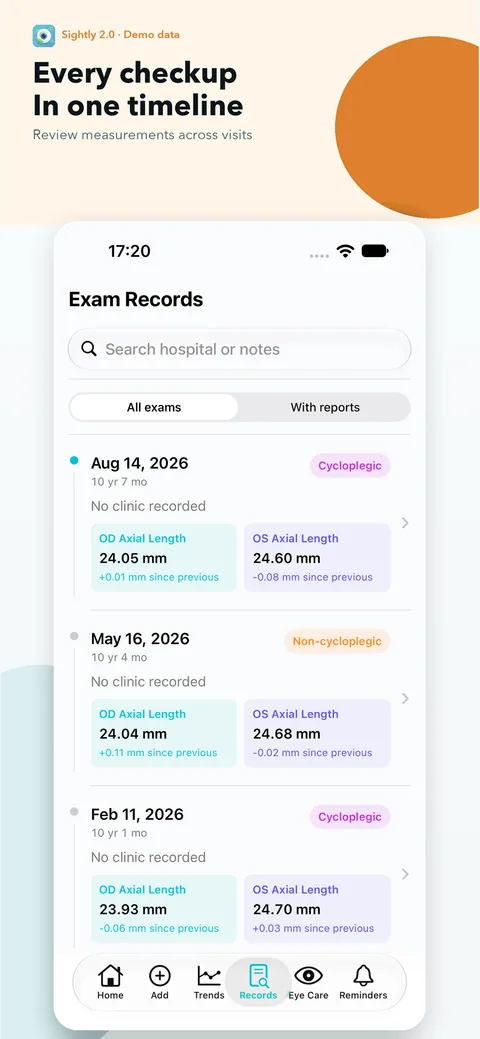
A photo roll can hold every report and still make the right one hard to find. The goal is not to transcribe every line: it is to connect each measurement to the visit, eye and original document it came from. You can follow this process with paper folders or a local app.
These guides cover record keeping and appointment preparation, not diagnosis or treatment. Sightly does not assess medical risk or recommend treatment. Your clinician interprets examinations and decides care and follow-up timing.
1. Gather the originals before entering numbers
Bring together paper reports, report photos, refraction printouts and notes from previous appointments. Work on one child’s records at a time. Put undated documents aside until you can confirm their dates rather than guessing from the order in your photo library.
Photograph the whole page in readable light. Keep the date, column labels, units and any footnotes visible. If a report has several pages, keep them together. A cropped number without its heading may be impossible to interpret later. Preserve the paper or original file as well as any transcription.
2. Make a timeline of visits, not a pile of measurements
Use the examination date as the main reference, not the day you imported a photo. Note the clinic and the type of examination. Two visits on the same day can still be separate events; use the clinician or clinic name in your notes to distinguish them.
A useful folder name is 2026-09-12_eye-exam, with a clinic label if needed. Avoid names or patient numbers in a folder you intend to share. If you find duplicate photos, compare the originals before removing anything. Reports from different visits can look almost identical.
3. Copy only what you can identify
Keep OD (right eye) and OS (left eye) separate. When present, record sphere, cylinder and axis under their own labels, retaining plus and minus signs. Keep axial length in millimetres and preserve the precision printed on the report. Do not turn a missing result into zero or copy a value from a previous visit to fill the gap.
Record whether refraction was measured with cycloplegia, without it, or whether the report leaves that unclear. Write “unknown” when you cannot confirm the condition. AAPOS explains that eye drops can help obtain an accurate refraction measurement in children; the examination context is therefore worth preserving. AAPOS: Refractive Errors in Children.
4. Check transcription against the report
Whether you type values or use OCR, review the date, eye labels, signs, decimal points and units before saving. Compare the result with the original, line by line. If a label is unclear, leave that item unentered and note your question for the clinic instead of trying to reconstruct it.
For example, a vision-only visit can remain a vision-only record. It does not need an invented axial length. A later visit can contain axial length and refraction without rewriting the earlier one. These are organizational examples, not advice about which examinations a child needs.
5. Separate the clinician’s notes from your observations
Keep instructions from the appointment in a clearly labelled note, including their date. Put your own questions in a separate paragraph. This avoids turning a remembered conversation or a family observation into a measured result.
If a number needs correcting, return to the original and fix that record. Do not silently replace an unfamiliar value with a “more plausible” one. If the original itself seems inconsistent, keep it and ask the clinic for clarification.
6. Keep a private, usable backup
Store reports somewhere you control. Do not post an unredacted report to a public forum: names, patient identifiers, QR codes and other details may reveal more than you expect. If you choose to share a copy, inspect every page and share only what the recipient needs.
Before changing devices or deleting an app, keep a backup you can find again. In Sightly, backup export and restore are manual; there is no automatic cross-device sync. Restoring a .sightlybackup replaces existing local records. Keep the current backup before restoring another one.
Quick checklist
- Each record uses the actual exam date.
- Right and left eyes, signs, units and labels match the original.
- Missing items are left missing; uncertain conditions are noted.
- Report pages and clinician notes are linked to the right visit.
- An original and a private backup are available.
Using Sightly
Sightly keeps measurements, report photos and doctor notes together on your device, without an account. On-device OCR assists entry, but you confirm the result. Free use includes 1 child, 10 exam records and 1 report photo per exam. Plus adds more children and records, multiple attachments, PDF import, doctor summaries and advanced trends. You do not need to buy Plus to begin a simple history.
Download Sightly on the App StoreMedical context and sources
The linked AAPOS page provides background on children’s refraction examinations. The filing steps and illustrative examples above are the Sightly Team’s record-keeping workflow, not a clinical protocol.
Written by the Sightly Team, the app’s product team. Not a clinician-reviewed medical article.
These guides cover record keeping and appointment preparation, not diagnosis or treatment. Sightly does not assess medical risk or recommend treatment. Your clinician interprets examinations and decides care and follow-up timing.